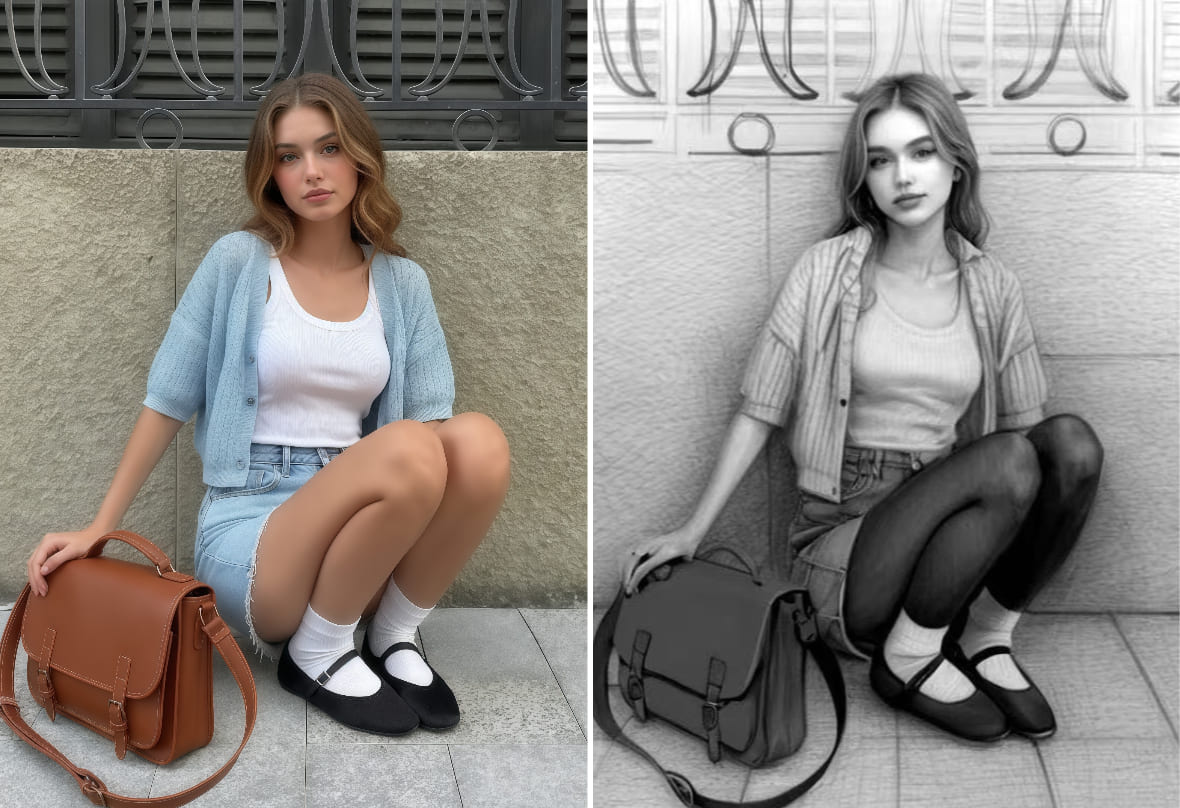
Photo to Sketch: Turn Photo to Line Drawing

Turn a photo to sketch with AI in one click. A wide range of sketch filters available, free to use & no watermark.


PhotoCat Photo to Sketch
Drag and drop Image here
IosIos
GoogleGoogle
PhotoCat Photo to Sketch

Turn Photos to Sketch without Drawing Skills

Transform an image into a detailed sketch instantly without using charcoal, ink, or pencil. Just upload your photo and let PhotoCat line art generator create pencil, charcoal, or other sketch styles instantly. Perfect for quick, realistic sketch art from any image, no skills or special software required.
PhotoCat Photo to Sketch

Apply Artistic Sketch Filters to Any Photos

Enhance your photos with the PhotoCat sketch filters and instantly give them an artistic touch. Turn a selfie into a custom avatar that looks like you or quickly generate a sketch version of your pet’s portrait. You can even convert landscapes or still life photos into elegant artworks for your space.
PhotoCat Photo to Sketch

HD Photo to Sketch Converter for Daily Use

PhotoCat image to sketch converter generates high-resolution images perfect for any purpose. Transform your photos into sketch art to use as custom wallpapers on your laptop or smartphone, or print them to display on your wall and create unique home décor that showcases your personal style.
PhotoCat Photo to Sketch

Instant Line Art Generator Free & Online

Get 100% free use of PhotoCat Photo to Sketch AI with no ads. Output images are watermark- and logo-free, and you can download and save your creations freely. Perfect for personal or commercial projects, letting you create and use sketch art without any restrictions.

Enjoy Unlimited Photo to Sketch Styles

Pencil Sketch
Line Sketch
Pen Sketch
Charcoal Sketch

Turn Any Image into a Pencil Sketch

A pencil sketch is a classic style for portraits. Use it to create artistic selfies for social media sites and forums. Creating an AI sketch of a friend or their pet is also a fun, spontaneous way to brighten your pal’s day and make them smile.
PhotoCat Photo to Sketch

Convert Photo to Line Drawing

The line sketch style renders your subject in black and white for a look that is bold, clean and simple. Use it to create a minimalist portrait or still life, or as an aid to help you understand form, light and shadow in a reference photo for traditional art.
PhotoCat Photo to Sketch

Create a Pen Sketch Version of Photo

Evoke the strong, dark lines of a pen by converting your photo into a pen sketch with AI. This style is excellent for capturing fine details and textures, making it a popular choice for sketching pictures of buildings and landscapes, but also pets and people.
PhotoCat Photo to Sketch

Mimic the Textures and Tones of Charcoal Art

The distinctive texture and blending effects make charcoal uniquely versatile. Turn portrait photos into evocative works of art, or convert landscape photos into charcoal scenes that fully capture atmospheric effects like fog or mist.
PhotoCat Photo to Sketch

How to Turn a Photo into a Sketch?

Upload original photo

Upload your selfie, or your pet photo to PhotoCat from your device.

Choose a sketch filter

Select from image to sketch filters you want, and then tap to apply it.

Download and save

Your photo to drawing will be ready within seconds. Download and save it to your device for free with no watermarks.

PhotoCat Photo to Sketch

User Reviews

Cory P.
“The PhotoCat sketch filter let me turn a photo of my girlfriend into a drawing. I then used it as a reference image to help me make a real drawing by hand. I gave it to her for our anniversary. She loved it.”
Nat R.
“I used PhotoCat AI to turn some of my vacation photos into charcoal drawings. I had prints made, and they’re now on my walls. When I have house guests, they often ask if I drew them myself.”
Terrance W.
“Our team used PhotoCat to convert our portraits into pen sketches for our company site and Slack avatars. The team images have become part of our branding, expressing our quirky corporate culture.”

FAQs

What is sketch art?

Sketch art is any artwork made by sketching. You can sketch with a pen, pencil, charcoal, pastels, or other mediums. PhotoCat AI lets you turn a photo into sketch with just one tap or click. You don’t need any drawing skills or tools.

How can you turn a photo into a line drawing?

It is easy to turn a picture into a drawing. Upload your photo to PhotoCat. Choose the line drawing filter. Then tap to apply.

Can I convert a photo to a sketch using my phone?

Yes. On your phone, open PhotoCat’s Photo to Sketch converter, upload your photo, and create a sketch in seconds.

Is PhotoCat photo to sketch converter free?

Yes. PhotoCat is a free online AI tool you can use to turn a photo into a sketch. There are no ads or watermarks.

How many sketch filters does PhotoCat include?

PhotoCat offers 8 exciting sketch filters you can use to sketch your photo.

Does PhotoCat have a black and white sketch filter?

Yes. PhotoCat features a black-and-white art filter to transform your photos into stunning monochrome art.

Is it legal to turn a photo into a sketch?

Yes, it is legal to turn any photo into a sketch for personal use. Please note that if you want to use the output commercially, you will need to own the rights to the original image.
Call to Action

Sketch Your Picture Now

Transform portraits, pets, or landscapes into stunning sketches online for free with PhotoCat.