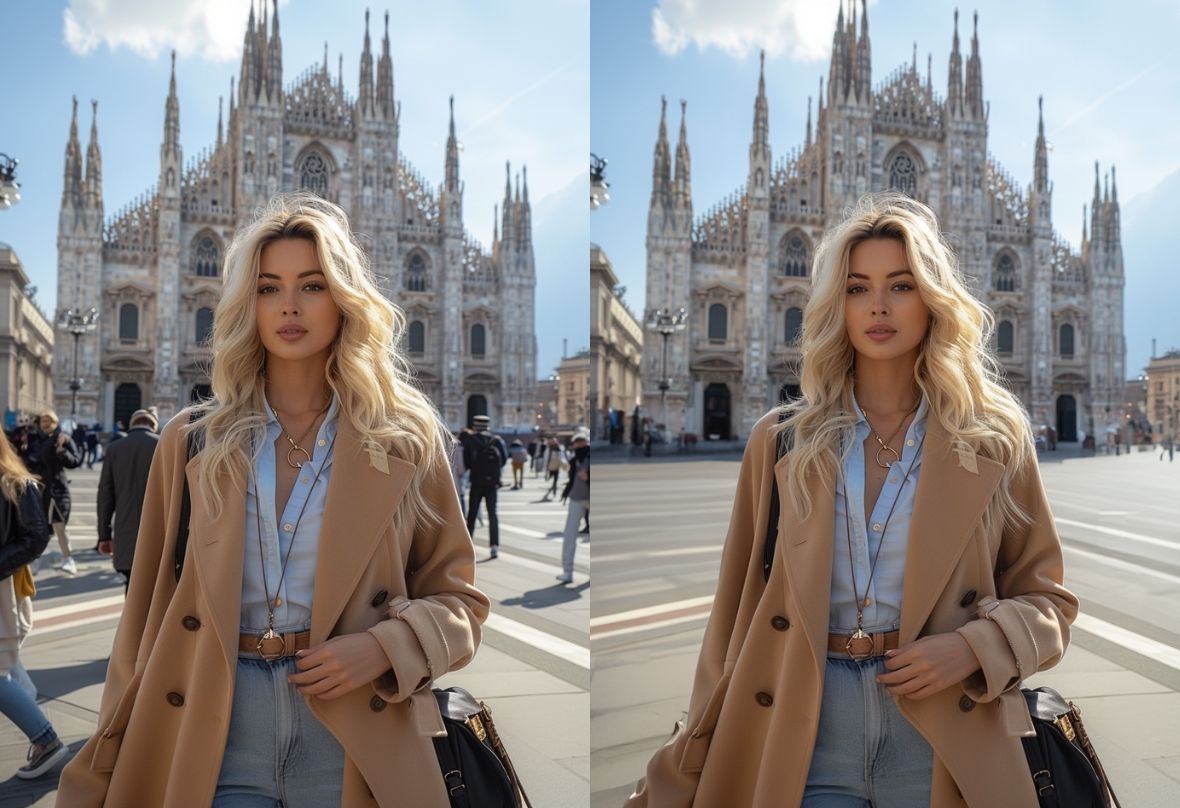
Remove People from Photo Free

PhotoCat’s AI tool makes it easy to remove people from photo. It’s free, fast, and watermark-free. Quickly erase distractions and restore backgrounds so every shot stays clean and perfectly focused.

PhotoCat Remove people from photo
Bulk edit up to 50 imagesDrag and drop Images here
IosIos
GoogleGoogle
PhotoCat Remove people from photo

Restore Travel Photos with AI People Remover

Whether you are capturing a sunset by the sea or taking portraits in front of landmarks, random people can easily distract from your story. Use PhotoCat to crop someone out of a photo with its powerful AI people remover. Erase unwanted figures, restore image balance, and let every memory stay vivid and full of emotion.
PhotoCat Remove people from photo

Erase People While Keeping Your Background

Erase a person from a photo can sometimes leave your background blurry or distorted, making the edit obvious. PhotoCat AI personal remover takes a smarter approach. It learns the background in your photo, whether it is a breathtaking landscape or a messy scene, and fills in the removed area seamlessly. The result looks completely natural as if the person was never there.
PhotoCat Remove people from photo

Detect Person in Photos with Less Manual Work

When a photo is packed with people, erasing each one manually can be a real hassle, especially when everyone is in different poses. PhotoCat AI people remover automatically detects all the people in your image and marks them for you. Just pick who you want to remove, click, and they are gone. It is quick, easy, and saves you a ton of time.
PhotoCat Remove people from photo

Seconds to Perfect: All-in-One Object Remover

It’s not just the people you want to remove from your photos. Sometimes it’s street signs you’d rather keep private, objects that don’t belong, or little details that distract from your perfect shot. With PhotoCat person remover, you can also erase objects, watermarks, and unwanted text with ease, turning complex fixes into quick wins.
PhotoCat Remove people from photo

Remove People from Photo Online Free

Just need to erase people from photos in a quick way? No problem. PhotoCat AI people remover lets you do it online, right in your browser. No downloads, no apps, just open and start editing. It works smoothly on both iPhone and Android. And the best part? You get free edits every day with completely watermark-free.

How to Remove a Person from a Photo?

Upload Your Photo

Choose any image where you’d like to erase people or background distractions.

Mark the People Area

AI will detect the person you want to remove automatically. Choose the person or use PhotoCat’s brush to change more details.

Download Instantly

Click “Erase” to remove someone from photo, which is ready to post, print, or share.

PhotoCat Remove people from photo

FAQs

How can I remove people from photo?

Upload your image to PhotoCat person remover, mark the person you want gone, and the tool automatically fills the background.

Can it accurately recognize people without deleting the background or other objects?

Yes. PhotoCat uses advanced AI detection to outline people precisely. It crops unwanted people while keeping every part of your background intact without random erasures. Every edit looks clean and natural, even around hair or detailed textures.

Can I manually adjust or refine the AI removal result?

Yes. After the AI automatically crops someone out of a photo, you can manually brush over any remaining areas for more precise edits. The brush tool lets you refine edges, restore details, or fine-tune the final look just the way you want.

Will my uploaded photos be saved or leaked?

No. All photos edited with PhotoCat are processed securely and automatically deleted after you finish. Your images are never stored, shared, or used for any other purpose. Your privacy is fully protected.

Do I need to download an app to use it?

No download is required. You can remove person from photo online free directly with PhotoCat’s browser. If you prefer mobile editing, the PhotoCat app is available for both iPhone and Android, offering the same easy experience.

Will the photo keep its original resolution after removing people?

Yes. PhotoCat keeps every detail intact and preserves full resolution. Every pixel stays clear and detailed, so your final photo looks just as high quality as the original, only cleaner and more focused.
Call to Action

Try PhotoCat AI People Remover Free

Erase unwanted people or crowds from your photos instantly with PhotoCat AI People Remover. Fast, precise, and completely free to try online.