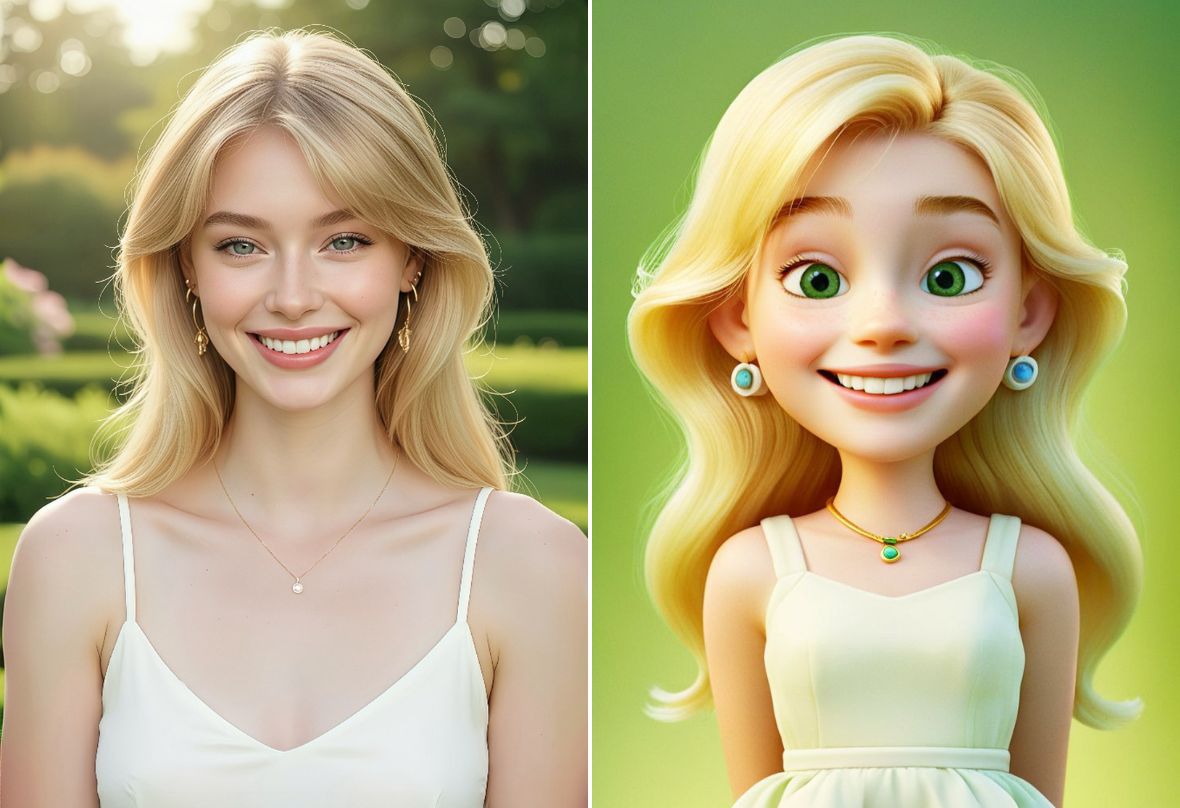
Turn Photo to Cartoon with AI Online

Use PhotoCat to turn photo to cartoon for free with one tap. Apply various AI cartoon filters to create fun, stylish images with no watermark.


PhotoCat Photo to Cartoon
Bulk edit up to 50 imagesDrag and drop Images here
IosIos
GoogleGoogle
PhotoCat Photo to Cartoon

Turn a Photo into a Cartoon with One Tap

No more endless guesswork using text-to-image generators to convert your image to a cartoon. PhotoCat enables you to turn any photo into a cartoon using free online cartoon filters with one tap, no drawing skills, no prompts and no costs required.
PhotoCat Photo to Cartoon

Cartoon Yourself into Avatars & Emojis

Express your playfulness by generating a unique social media avatar that looks like claymation, pixels, a 3D film, or other cartoon styles. You can also use PhotoCat to generate cartoon stickers and emojis to bring personality to your online chats with friends.
PhotoCat Photo to Cartoon

See Your Pet as an Adorable Cartoon

Find out how adorable your cat, dog, or other pet would be transformed into a cartoon. Use your cartoon pet image as an illustration for a story, a reference image for a comic or animation project, or print it out as a special piece of artwork for your wall.
PhotoCat Photo to Cartoon

Make Landscapes into Cartoon Art

Convert a photo of a landscape into a cartoon that looks like a Disney movie background or a pixel landscape from a retro video game. Cartoon landscape images are great for making posters, postcards, wallpapers, or as inspiration for your next drawing or painting.

Popular Photo to Cartoon Styles

Disney filter
Clay filter
Webtoon Filter
Pixel Filter

Turn Yourself into a Disney Character

See what you or a friend would look like as a Disney film character. This filter generates images in the iconic Disney style of American animation, with exaggerated character proportions, big eyes, lively, expressive faces, bright colors, and realistic light and shadow. Use it to illustrate a story or to make reference images for hand-drawn animations.
PhotoCat Photo to Cartoon

Transform Any Image into Claymation

Make the subjects and landscapes in your images look like they were sculpted out of clay. The rounded, cute shapes and realistic textures can bring warmth and playfulness to your art. The clay filter is ideal for illustrations, animations and short films.
PhotoCat Photo to Cartoon

Make Your Photo into a Webtoon

Bring the clean lines, simple backgrounds, and soft colors and lighting of Korean comic style webtoons to your photos. Tap to convert any photo instantly into a webtoon for social media or animated stickers. You can even generate webtoon images to create your own comic book.
PhotoCat Photo to Cartoon

Get a Retro Game Style with Pixel Art

Turn your photos into pixel art with high contrast colors to evoke the nostalgia of the retro gaming era. Create a pixel avatar to share your love of retro games in social media or gaming forum profiles, or convert photos into pixel art wallpapers to bring retro style to your device.
PhotoCat Photo to Cartoon

How to Convert Photo to Cartoon?

Upload the photo

Upload the photo you want to convert to a cartoon to PhotoCat. No downloads are necessary.

Choose a cartoon filter

Select any of the PhotoCat cartoon filters, and tap to apply.

Cartoonize a picture

The AI will automatically convert your photo to a cartoon. Download and save the cartoonized output to use in personal or commercial projects.

PhotoCat Photo to Cartoon

User Reviews

Mike L.
“I used PhotoCat cartoon filters to make a series of claymation images for an art project for school. The style was just what I wanted, and I got an A.”
Randall P.
“I used the webtoon filter to create some character concepts for a comic I’m drawing. It helped me brainstorm and get a feel for how each character would look.”
Ellen U.
“I’m writing a children’s book about my cat. I’ve been using PhotoCat cartoon filters to make illustrations using my photos. It’s just the adorable look I wanted for my book.”

FAQs

How do I convert a photo into a cartoon on my iPhone?

You can cartoonize a picture by uploading it from your iPhone to PhotoCat in your browser. Then simply choose the cartoon filter you want to apply, and everything is done.

Can I convert a photo into a 3D cartoon?

Yes. Simply select the 3D cartoon filter in PhotoCat and tap to apply it to your image. The AI will generate a 3D cartoon version of your photo within seconds.

Is it free to convert photos to cartoons with AI?

Yes, it is free to turn a picture into a cartoon using PhotoCat AI filters. Just upload your photos and tap to convert them into any of the available cartoon styles.

Will there be a watermark on the finished image?

No, we allow you to convert a photo to a cartoon online for free without any watermarks or logos. When you download the image, it will be exactly as you see it on the website, without any identifying marks.

Why use PhotoCat cartoon photo conversion instead of ChatGPT?

ChatGPT requires you to write a prompt to cartoonify an image, which involves time, trial and error, and skill. PhotoCat is completely automatic. You do not have to write a prompt. You just upload the photo, select the cartoon filter you want, and tap to convert your image.

What is the best free AI cartoon filter?

PhotoCat is the best and easiest way to turn photos into cartoons using AI. We offer a variety of fun cartoon filters you can apply with a single tap.
Call to Action

Cartoon a Picture with One Click

Turn a picture into a cartoon for free with no download or watermarks.