Photo to Anime Converter

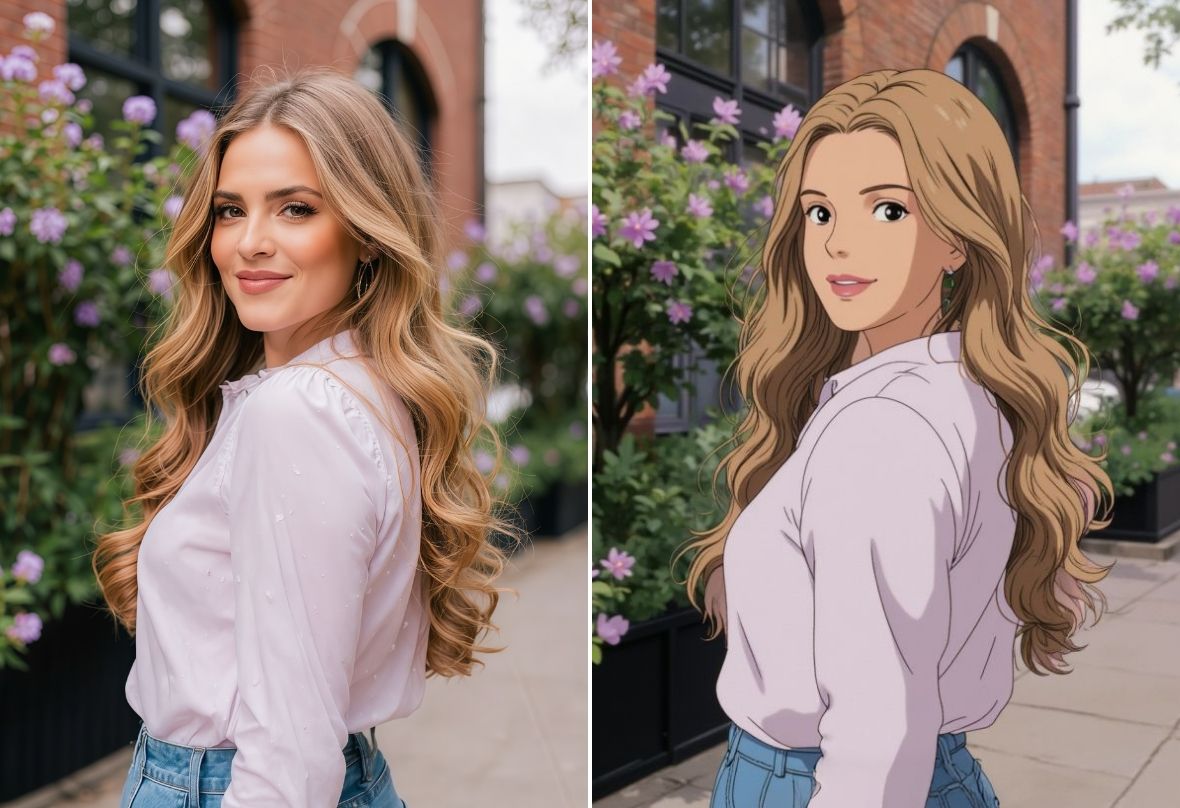
Easily transform your photo to anime with PhotoCat AI-powered online anime filter. Endless anime styles, 100% free and watermark free.


PhotoCat Photo to Anime Converter
Bulk edit up to 50 imagesDrag and drop Images here
IosIos
GoogleGoogle
PhotoCat Photo to Anime Converter

Turn Photo to Anime In One Click

PhotoCat photo to anime converter instantly transforms any image into anime using AI machine learning. Tap to transfer the anime style of your choice to a selfie, pet photo, or any other type of image in seconds. No manual skills or special software are needed.
PhotoCat Photo to Anime Converter

Free Anime Filters in Various Styles

PhotoCat offers a variety of anime-style filters. A chibi filter will make your subject adorable, while a Studio Ghibli-inspired filter will recreate the style of flicks like Spirited Away or Princess Mononoke. For even more eye-catching results, use a 3D avatar filter or a realistic anime filter.
PhotoCat Photo to Anime Converter

Anime Photo Generator for Any Photos

You can turn any image to anime with PhotoCat, no matter what kind of photo it is. Create an anime selfie for your social media profile, find out what your pet would look like as a cute anime character, or even make your vacation photo look like an enchanting landscape of Japanese manga.
PhotoCat Photo to Anime Converter

Anime Yourself Online with HD Outputs

PhotoCat animated outputs are high-resolution images suitable for wallpaper, website, or any other application. Generate anime images completely free with no watermarks or ads. You can always download and save your anime photos for personal or commercial use.

Fun Ways to Use PhotoCat Photo to Anime Converter

Anime PFP
Wallpaper
Anime Drawing
Stickers & Emojis

Create Anime Avatar for Social Media

Anime yourself or a friend with PhotoCat’s AI anime avatar filters. Try out different filters to see how you would look in different anime styles. Download the output to use as a profile picture (PFP) that expresses your personality and love of anime for social media, forums or games.
PhotoCat Photo to Anime Converter

Custom Anime Wallpapers for Your Device

Create the perfect personalized wallpaper for your laptop or phone. Just upload your image and tap to convert it into an anime image. The high-resolution output can fill up your screen while retaining smooth lines and sharp, clear details.
PhotoCat Photo to Anime Converter

Convert Photo to Anime Artwork

It is quick and easy to use the PhotoCat anime converter tool to create customized anime artwork. Share it on social media with your friends, or print it out to make posters to decorate your room. Custom anime art from a photo can also work great as a reference for artists and designers working in traditional mediums.
PhotoCat Photo to Anime Converter

Turn Photo to Anime Stickers and Emojis

Transform selfies or photos of friends or pets into chibi or 3D avatar styles. Use the anime output images to create custom stickers and emojis. Turn every chat with friends into a fun conversation on social media and chat channels.
PhotoCat Photo to Anime Converter

How to Convert Photo to Anime Style?

Upload the photo

To upload a photo, simply drag & drop it from your device into PhotoCat.

Apply the anime filter.

Select any of our AI filters and tap to apply. PhotoCat's AI will generate an image in the anime style you chose, using your photo as a reference.

Download and save.

Download and save the final anime version of your photo on your device.

PhotoCat Photo to Anime Converter

User Reviews

Agnes L.
“I’ve been creating avatars with PhotoCat.. When I uploaded my new avatar to the anime forum where I hang out, everyone wanted to make their own. I sent them to PhotoCat, and now we all have cool anime profile pics.”
Laura R.
“I used PhotoCat’s filters to create an anime backdrop from a group vacation photo with my friends. They loved it so much that we’re all now using it as our wallpaper on our phones. I was amazed by how fast and easy it was to create a beautiful art.”
Enrico B.
“I’m teaching myself how to paint. I used the Studio Ghibli filter from PhotoCat to transform some photos I took so they’d look like Ghibli landscapes. Now I’m using the outputs as references for my paintings.”

FAQs

How long does it take to turn a photo into anime?

The PhotoCat photo to anime converter online takes around 10 seconds to generate an anime output. Just upload your photo and tap to apply the anime filter.

Does PhotoCat have a Studio Ghibli filter?

Yes, you can turn an image into anime with a style similar to the whimsical landscapes and loveable characters from Studio Ghibli films like My Neighbor Totoro, Spirited Away, or Howl’s Moving Castle. Choose any Ghibli-inspired style and tap to apply.

Who owns the right to the photos I convert into anime with your tool?

If you own the rights to your original photo, then you automatically own the rights to the AI output image.

Do I need to download an app to turn photos into anime?

No, the PhotoCat photo to anime converter online free tool works in your browser. You do not need to download anything. It is compatible with your laptop, desktop computer, tablet or smartphone.

Are the exported images high-resolution?

Yes, you can get high-resolution images with the PhotoCat anime photo generator. You can also use our free Image Enhancement tool to raise the resolution if needed.

How many photos can I convert to anime for free?

You will get five complimentary credits when you sign up for PhotoCat. You can use those credits to convert photos into anime for free.
Call to Action

Anime Yourself Now

Transform any photo into anime instantly with no downloads or watermarks.