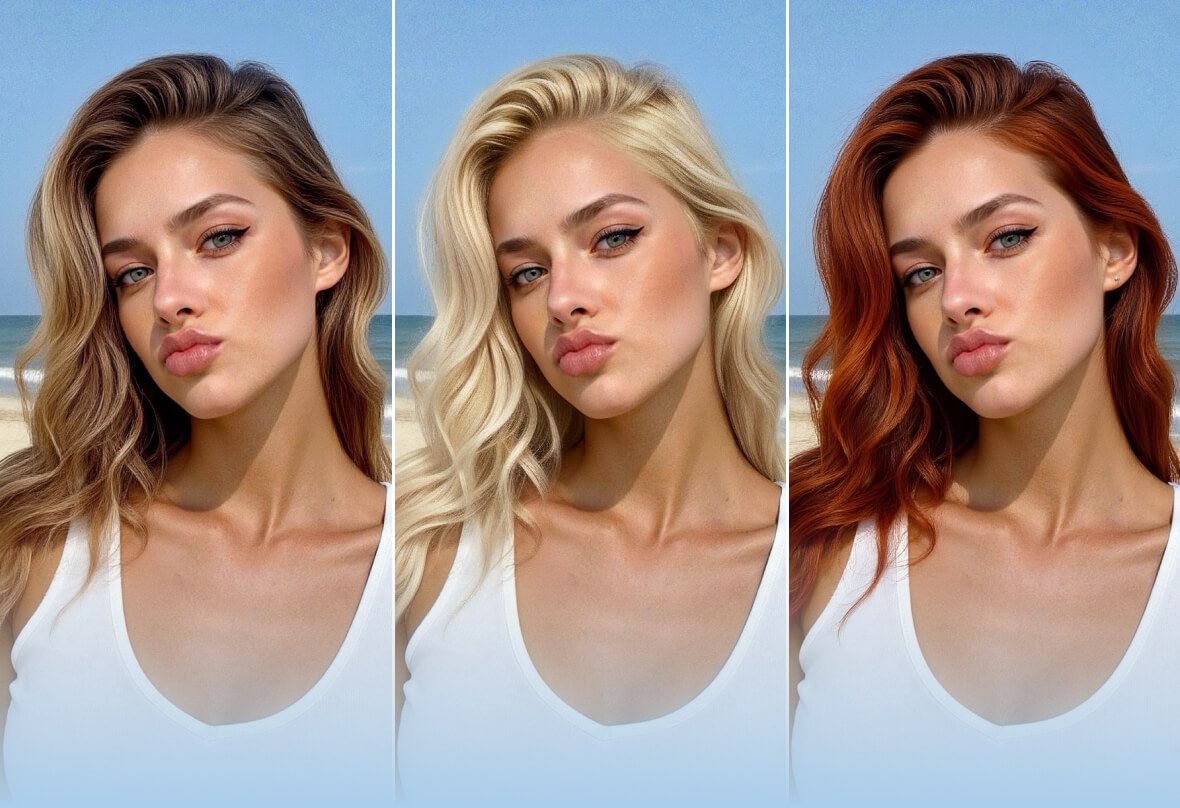
Hair Color Changer

Skip the salon. Try free hair color changer to see what color should you dye your hair. 

PhotoCat Hair Color Changer
Bulk edit up to 50 imagesDrag and drop Images here
IosIos
GoogleGoogle
PhotoCat Hair Color Changer

Test Hair Color on Photo with AI

PhotoCat Hair Color Changer uses cutting edge artificial intelligence (AI) technology to overlay a hair color of your choice in real-time, giving you an immersive experience of how you would look. PhotoCat hair color try on tool detects the lighting in your photo to deliver realistic results and high color accuracy.
PhotoCat Hair Color Changer

Try on Hair Color in a Single Tap

The AI hair color generator is effortless to use. Just upload your photo and tap to apply a new hair color. The AI automatically detects the outlines of your hair so you do not need to manually brush or erase. It can even color fine strands of hair without getting color on your face or the backdrop.
PhotoCat Hair Color Changer

Experience Different Hair Dye Filters

Try out any look with our hair color filter. Pick a classic shade like black, brown, blonde, or natural red, or choose a vibrant hue like blue, green, orange or bold red. Fully customize your look by experimenting with ombre gradients. You can also apply highlights to specific sections of hair.
PhotoCat Hair Color Changer

Before & After Hair Color Simulator

Easily compare your original hair color with a new one using the split-screen slider. The slider tool is also helpful for comparing different colors you are thinking of trying to each other, or for selecting just the right shade of a particular color. 

Trending Hair Color Try On Styles

Want to know "what hair color looks best on me"? Try on trending hair colors and find your perfect match.

Blonde Hair

Black Hair

Brown Hair

Red Hair

Highlighted Hair

Blonde Hair
Black Hair
Brown Hair
Red Hair
Highlighted Hair

Why Choose PhotoCat Hair Color Changer?

what
No Download Required
Use PhotoCat Hair Color Changer in your browser without downloading an app. It is compatible with desktop, laptop, smartphone and tablet.
what
Try Hair Colors for Free
Most PhotoCat hair color filter features and tools are completely free with no watermarks or ads. Save on hair dyes by finding your perfect color.
what
Your Data Stays Private 
We never collect, store or share your private data. After you close out of PhotoCat, we delete your photos from our servers.

How to Use PhotoCat Hair Color Changer?

Upload your photo.

Upload a selfie to our site. For best results, use a photo with natural, neutral light, and no obstructions.

Apply hair colors.

Choose any of the hair colors, ombre effects, or highlight options from our templates, and tap to automatically apply.

Download and save.

Download the finished image and save it to your device. Use it for reference when buying hair dyes, or to share it with your friends.

PhotoCat Hair Color Changer

User Reviews

Ella D.
“Due to tariffs, buying hair dyes has become expensive where I live. PhotoCat Hair Color Changer lets me try out different hair colors for free. That way, I don’t waste money buying dye colors that don’t suit me.”
Norm A.
“PhotoCat does a great job with different hair colors. The results are so realistic that when I posted one of the outputs to social media, all my friends thought I actually dyed my hair until I told them it was just a filter.”
Lucy M.
“I was trying to figure out the perfect dye color to complement my dress for a special occasion. I only had a few weeks to plan, so I just had one shot at getting it right. PhotoCat helped me find a wonderful color that looked amazing with my dress.”

FAQs

Can I cover my gray or white hair with virtual hair coloring?

Yes, you can try on hair color virtually using PhotoCat no matter what your real life hair color is. Even if your hair in the photo is gray or white, you can see what you’d look like with a hair color of your choice.

How many hair colors can I try on with PhotoCat Hair Color Changer?

PhotoCat Hair Color Changer includes over 20 different hair colors you can try. This hair color tester also lets you try on highlights or ombre gradients of hues.

Does the tool automatically detect and select the hair area?

Yes, the hair color simulator uses AI to automatically detect the hair area, even with irregular, spiky or wispy cuts. It will select the correct area and seamlessly add the new color, digitally dying every strand and transitioning naturally with the hairline for a realistic look.

Can I use the tool directly on the website?

Our hair color online filter tool can be used in your web browser. You do not need to download an app.

Will the tool work to color long hair, curly hair, or a complex hairstyle?

Yes, the AI can detect the edges of your hair as well as individual strands, ensuring that the hair is fully and accurately colored while the background and your face remain untouched.

Will there be a watermark on the photo when I download it?

No, PhotoCat Hair Color Changer is free to use with no ads or watermarks. The download will look exactly like the output you see on the website when you use the tool.

Is my data safe and private when I upload my selfie to the tool?

Yes, we never share your data with third parties. After you are done with the tool, we delete your images. So, make sure to download whatever you want to keep.
Call to Action

Try Out Hair Colors Online

PhotoCat Hair Color Changer can instantly show you how you’d look with different hair colors. Tap to apply virtual hair colors online.